mirror of
https://github.com/openai/codex.git
synced 2026-05-12 23:32:44 +00:00
 5f4d0ec343
## Summary TL;DR: teaches `codex-rs` / app-server to request a desktop-provided attestation token and attach it as `x-oai-attestation` on the scoped ChatGPT Codex request paths. 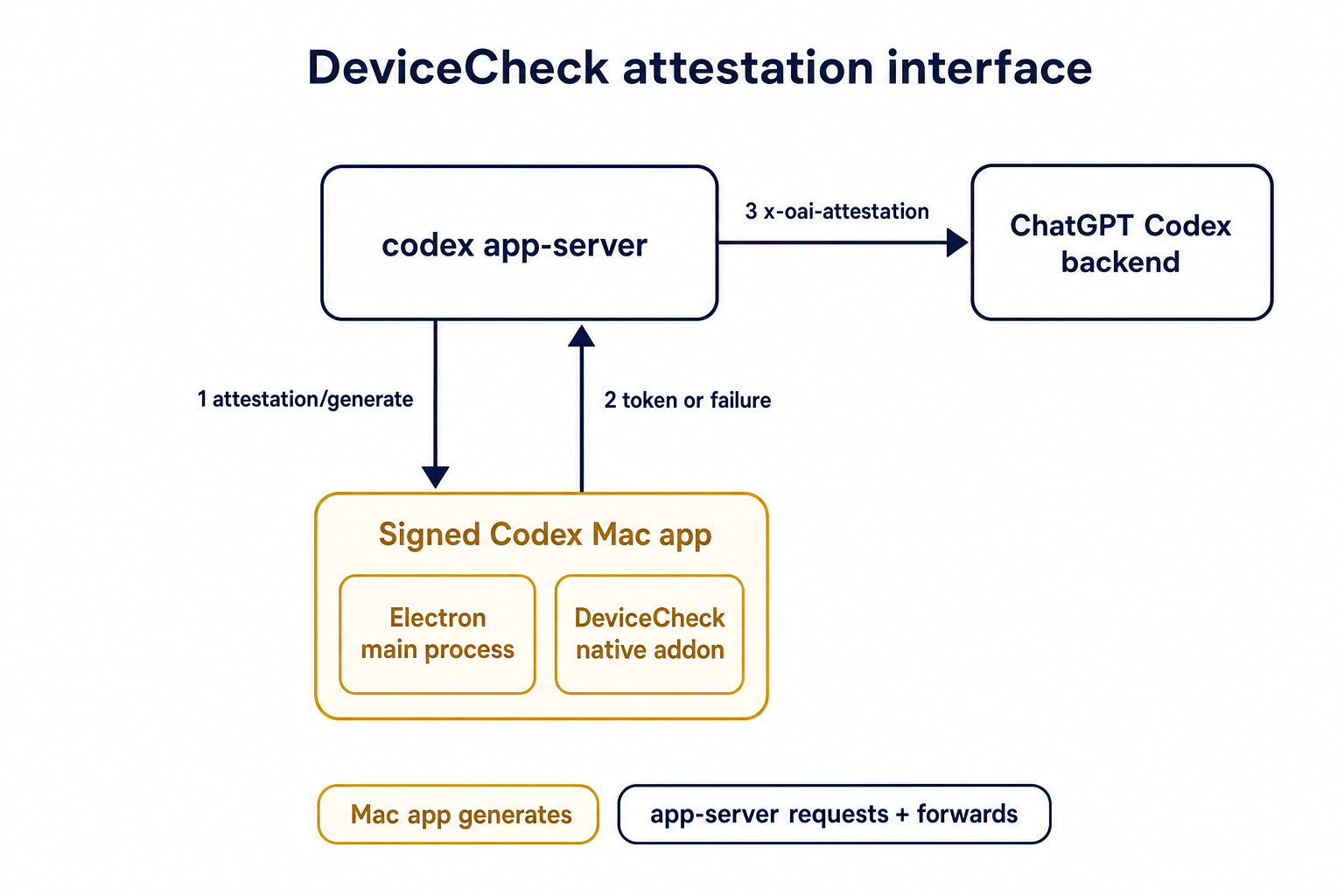 ## Details This PR teaches the Codex app-server runtime how to request and attach an attestation token. It does not generate DeviceCheck tokens directly; instead, it relies on the connected desktop app to advertise that it can generate attestation and then asks that app for a fresh header value when needed. The flow is: 1. The Codex desktop app connects to app-server. 2. During `initialize`, the app can advertise that it supports `requestAttestation`. 3. Before app-server calls selected ChatGPT Codex endpoints, it sends the internal server request `attestation/generate` to the app. 4. app-server receives a pre-encoded header value back. 5. app-server forwards that value as `x-oai-attestation` on the scoped outbound requests. The code in this repo is mostly protocol and runtime plumbing: it adds the app-server request/response shape, introduces an attestation provider in core, wires that provider into Responses / compaction / realtime setup paths, and covers the intended scoping with tests. The signed macOS DeviceCheck generation remains owned by the desktop app PR. ## Related PR - Codex desktop app implementation: https://github.com/openai/openai/pull/878649 ## Validation <details> <summary>Tests run</summary> ```sh cargo test -p codex-app-server-protocol cargo test -p codex-core attestation --lib cargo test -p codex-app-server --lib attestation ``` Also ran: ```sh just fix -p codex-core just fix -p codex-app-server just fix -p codex-app-server-protocol just fmt just write-app-server-schema ``` </details> <details> <summary>E2E DeviceCheck validation</summary> First validated the signed desktop app boundary directly: launched a packaged signed `Codex.app`, sent `attestation/generate`, decoded the returned `v1.` attestation header, and validated the extracted DeviceCheck token with `personal/jm/verify_devicecheck_token.py` using bundle ID `com.openai.codex`. Apple returned `status_code: 200` and `is_ok: true`. Then ran the fuller app + app-server flow. The packaged `Codex.app` launched a current-branch app-server via `CODEX_CLI_PATH`, and a local MITM proxy intercepted outbound `chatgpt.com` traffic. The app-server requested `attestation/generate` from the real Electron app process, and the intercepted `/backend-api/codex/responses` traffic included `x-oai-attestation` on both routes: ```text GET /backend-api/codex/responses Upgrade: websocket x-oai-attestation: present POST /backend-api/codex/responses Upgrade: none x-oai-attestation: present ``` The captured header decoded to a DeviceCheck token that also validated with Apple for `com.openai.codex` (`status_code: 200`, `is_ok: true`, team `2DC432GLL2`). </details> --------- Co-authored-by: Codex <noreply@openai.com>

App Server Test Client
Quickstart for running and hitting codex app-server.
Quickstart
Run from <reporoot>/codex-rs.
# 1) Build debug codex binary
cargo build -p codex-cli --bin codex

# 2) Start websocket app-server in background
cargo run -p codex-app-server-test-client -- \
  --codex-bin ./target/debug/codex \
  serve --listen ws://127.0.0.1:4222 --kill

# 3) Call app-server (defaults to ws://127.0.0.1:4222)
cargo run -p codex-app-server-test-client -- model-list
Watching Raw Inbound Traffic
Initialize a connection, then print every inbound JSON-RPC message until you stop it with
Ctrl+C:
cargo run -p codex-app-server-test-client -- watch
Testing Thread Rejoin Behavior
Build and start an app server using commands above. The app-server log is written to /tmp/codex-app-server-test-client/app-server.log
1) Get a thread id
Create at least one thread, then list threads:
cargo run -p codex-app-server-test-client -- send-message-v2 "seed thread for rejoin test"
cargo run -p codex-app-server-test-client -- thread-list --limit 5
Copy a thread id from the thread-list output.
2) Rejoin while a turn is in progress (two terminals)
Terminal A:
cargo run --bin codex-app-server-test-client -- \
  resume-message-v2 <THREAD_ID> "respond with thorough docs on the rust core"
Terminal B (while Terminal A is still streaming):
cargo run --bin codex-app-server-test-client -- thread-resume <THREAD_ID>