mirror of
https://github.com/nocodb/nocodb.git
synced 2026-04-30 00:56:38 +00:00

1.8 KiB
1.8 KiB
title, description, position, category, menuTitle
| title | description | position | category | menuTitle |
|---|---|---|---|---|
| Lookup | Lookup | 550 | Product | Lookup |
Lookup
Sample simple Organization structure:
- 5 verticals, each vertical has a team name & associated team code
- 5 employees working at different verticals
- Vertical has many Employees : relationship has been defined
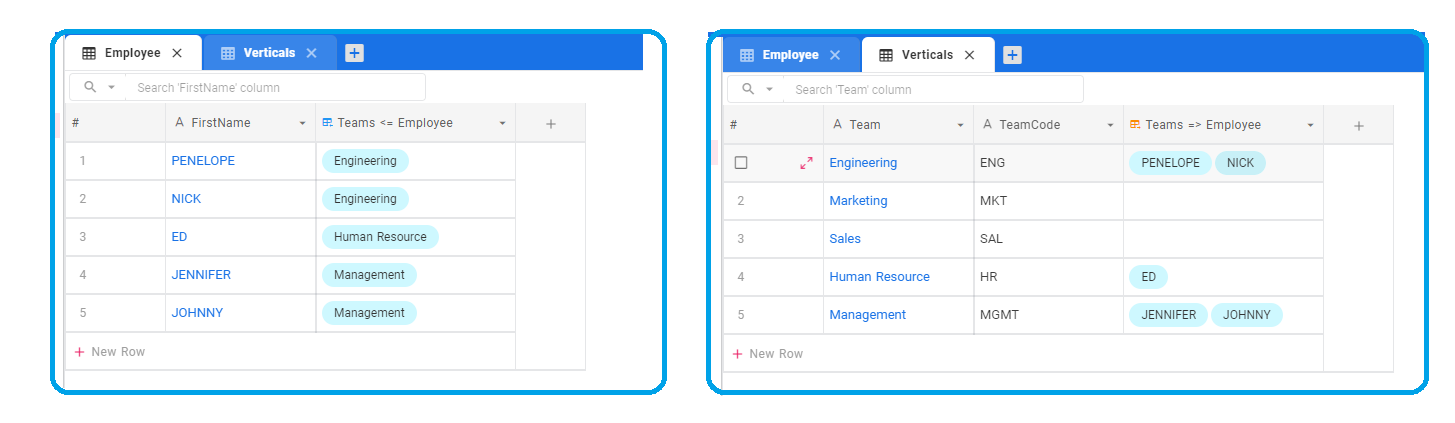
Now, we can explore how to extract team-code information in Employee table using "LOOKUP" columns
Adding a lookup column
1. Add new column
 Click on '+' icon to the left of column headers in Employee table
2. Feed column name

3. Select column type as 'Lookup'

4. Choose child table
Table Verticals in our example

5. Select child column

6. Click on 'Save'

7. Required information is populated in the newly created column
