mirror of
https://github.com/nocodb/nocodb.git
synced 2026-02-01 22:08:33 +00:00

184 lines
7.4 KiB
Markdown
184 lines
7.4 KiB
Markdown
<h1 align="center" style="border-bottom: none">
|
||
<b>
|
||
<a href="https://www.nocodb.com">NocoDB </a><br>
|
||
</b>
|
||
✨ オープンソースのAirtableの代替案 ✨ <br>
|
||
|
||
</h1>
|
||
<p align="center">
|
||
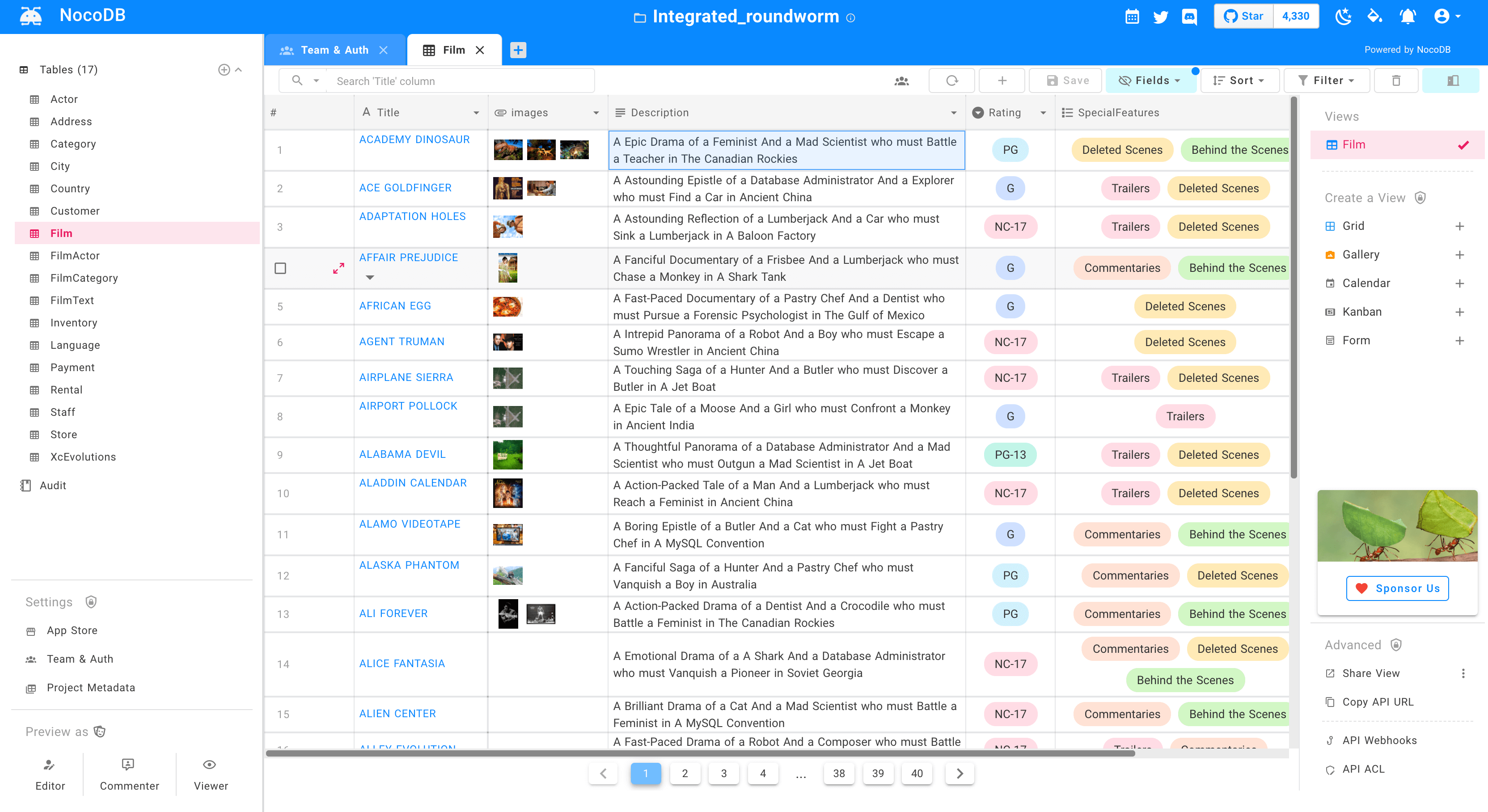
MySQL、PostgreSQL、SQL Server、SQLite&Mariadbをスマートスプレッドシートに変換します。
|
||
</p>
|
||
<div align="center">
|
||
|
||
[](https://travis-ci.com/github/NocoDB/NocoDB)
|
||
[](http://nodejs.org/download/)
|
||
[](https://conventionalcommits.org)
|
||
|
||
</div>
|
||
|
||
<p align="center">
|
||
<a href="http://www.nocodb.com"><b>Website</b></a> •
|
||
<a href="https://discord.gg/5RgZmkW"><b>Discord</b></a> •
|
||
<a href="https://twitter.com/nocodb"><b>Twitter</b></a> •
|
||
<a href="https://www.reddit.com/r/NocoDB/"><b>Reddit</b></a> •
|
||
<a href="https://docs.nocodb.com/"><b>Documentation</b></a>
|
||
</p>
|
||
|
||
|
||
|
||
<img src="https://static.scarf.sh/a.png?x-pxid=c12a77cc-855e-4602-8a0f-614b2d0da56a" />
|
||
|
||
<p align="center">
|
||
<a href="https://www.producthunt.com/posts/nocodb?utm_source=badge-featured&utm_medium=badge&utm_souce=badge-nocodb" target="_blank"><img src="https://api.producthunt.com/widgets/embed-image/v1/featured.svg?post_id=297536&theme=dark" alt="NocoDB - Free & Self-hostable Airtable alternative | Product Hunt" style="width: 250px; height: 54px;" width="250" height="54" /></a>
|
||
</p>
|
||
|
||
# クイック試し
|
||
|
||
### Docker を使う
|
||
|
||
```bash
|
||
docker run -d \
|
||
--name noco \
|
||
-v "$(pwd)"/nocodb:/usr/app/data/ \
|
||
-p 8080:8080 \
|
||
nocodb/nocodb:latest
|
||
```
|
||
|
||
- NocoDBは入力としてデータベースが必要です:[本番環境設定](https://github.com/nocodb/nocodb/blob/master/README.md#production-setup)を参照してください。
|
||
- この入力がない場合、SQLiteにフォールバックします。SQLiteでデータを保持するために、`/usr/app/data/`をマウントします。
|
||
|
||
例:
|
||
|
||
```
|
||
docker run -d \
|
||
--name noco \
|
||
-v "$(pwd)"/nocodb:/usr/app/data/ \
|
||
-p 8080:8080 \
|
||
-e NC_DB="pg://host.docker.internal:5432?u=root&p=password&d=d1" \
|
||
-e NC_AUTH_JWT_SECRET="569a1821-0a93-45e8-87ab-eb857f20a010" \
|
||
nocodb/nocodb:latest
|
||
```
|
||
|
||
|
||
### GUI
|
||
|
||
アクセスダッシュボードを使用する : [http://localhost:8080/dashboard](http://localhost:8080/dashboard)
|
||
|
||
# 私たちのコミュニティに参加する
|
||
|
||
<a href="https://discord.gg/5RgZmkW">
|
||
<img src="https://discordapp.com/api/guilds/661905455894888490/widget.png?style=banner3" alt="">
|
||
</a>
|
||
<br>
|
||
<br>
|
||
|
||
# スクリーンショット
|
||
|
||

|
||
<br>
|
||
|
||

|
||
<br>
|
||
|
||

|
||
<br>
|
||
|
||

|
||
<br>
|
||
|
||

|
||
<br>
|
||
|
||

|
||
<br>
|
||
|
||

|
||
<br>
|
||
|
||

|
||
<br>
|
||
|
||

|
||
<br>
|
||
|
||

|
||
<br>
|
||
|
||

|
||
<br>
|
||
|
||
# 特徴
|
||
|
||
### リッチスプレッドシートインターフェース
|
||
|
||
検索、並べ替え、フィルタリング、列の非表示
|
||
|
||
- ⚡ ビューを作成する:グリッド、ギャラリー、カンバン、ガント、フォーム
|
||
- ⚡ シェアビュー:Public&Password Protected.
|
||
- ⚡ パーソナル&ロックビュー
|
||
- ⚡ 画像をセルにアップロードする(S3、Minio、GCP、Azure、Digitalocean、Linode、Ovh、Backblaze で動作します)。
|
||
- ⚡ ロール:所有者、作成者、エディタ、コメンタ、ビューア、コメンタ、カスタムロール。
|
||
- ⚡ アクセス制御:データベース、テーブル&カラムレベルでも微細に粒度のアクセス制御。
|
||
|
||
### ワークフロー自動化のための App Store
|
||
|
||
- ⚡ チャット:マイクロソフトチーム、Slack、Discord、マッピー
|
||
- ⚡ メール:SMTP、SE、MailChimp
|
||
- ⚡ SMS:Twilio.
|
||
- ⚡ whatsapp.
|
||
- ⚡ 第三者 APIS
|
||
|
||
### プログラムによる API アクセスによるアクセス
|
||
|
||
- ⚡ REST APIS(Swagger)
|
||
- ⚡ GraphQLAPI。
|
||
- ⚡ JWT 認証とソーシャル AUTH を含む
|
||
- ⚡ ZAPIER、Integomat と統合する API トークン。
|
||
|
||
# Production Setup
|
||
|
||
NoCodb には、スプレッドシートビューと外部データベースのメタデータを格納するためのデータベースが必要です。このデータベースの接続パラメータは、NC_DB 環境変数で指定できます。
|
||
|
||
## Docker
|
||
|
||
|
||
#### Postgresの例
|
||
|
||
```
|
||
docker run -d -p 8080:8080 \
|
||
-e NC_DB="pg://host:port?u=user&p=password&d=database" \
|
||
-e NC_AUTH_JWT_SECRET="569a1821-0a93-45e8-87ab-eb857f20a010" \
|
||
nocodb/nocodb:latest
|
||
```
|
||
|
||
|
||
## Docker Compose
|
||
|
||
```
|
||
git clone https://github.com/nocodb/nocodb
|
||
cd nocodb
|
||
cd docker-compose
|
||
cd pg
|
||
docker compose up -d
|
||
```
|
||
|
||
## 環境変数
|
||
|
||
[環境変数](https://docs.nocodb.com/getting-started/self-hosted/environment-variables)をご参照ください
|
||
|
||
# 開発セットアップ
|
||
|
||
[開発セットアップ](https://docs.nocodb.com/engineering/development-setup)をご参照ください
|
||
|
||
# コントリビュート
|
||
|
||
[コントリビューションガイド](https://github.com/nocodb/nocodb/blob/master/.github/CONTRIBUTING.md)をご参照ください。
|
||
|
||
# 開発の目的
|
||
|
||
ほとんどのインターネットビジネスは、ビジネスニーズを解決するためにスプレッドシートかデータベースのどちらかを用いています。表計算ソフトは、毎日10億人以上の人が共同作業で使っています。しかし、コンピューティングに関しては、より強力なツールであるデータベースで同様のスピードで作業するのは、かなり遅れています。SaaSでこれを解決しようとすると、ひどいアクセスコントロール、ベンダーの囲い込み、データの囲い込み、突然の価格変更、そして最も重要なこととしては、将来における可能性に対する隠れた制限が存在することです
|
||
|
||
# 私たちの使命
|
||
|
||
私たちの使命は、データベース用の最も強力なノーコードインターフェイスを、世界中のすべてのインターネットビジネスにオープンソースで提供することです。これは、強力なコンピューティングツールへのアクセスを民主化するだけでなく、インターネット上で根本的な改修と構築の能力を持つ10億人以上の人々を生み出すでしょう。
|