mirror of
https://github.com/nocodb/nocodb.git
synced 2026-04-30 18:46:36 +00:00

276 lines
7.4 KiB
Markdown
276 lines
7.4 KiB
Markdown
---
|
|
title: 'Create webhook'
|
|
description: 'Learn how to create a webhook in NocoDB.'
|
|
tags: ['Webhook', 'Create']
|
|
keywords: ['NocoDB webhook', 'create webhook']
|
|
---
|
|
|
|
## Create Webhook
|
|
|
|
### Accessing webhook page
|
|
|
|
1. Click on table for which webhook needs to be configured on the left sidebar
|
|
2. Open `Details` tab in topbar,
|
|
3. Click on `Webhooks` tab
|
|
4. Click `Add New Webhook`
|
|
|
|

|
|
|
|
### Configuring webhook
|
|
|
|
1. Name of the webhook
|
|
2. Select the event for which webhook needs to be triggered
|
|
|
|
| Trigger | Details |
|
|
|-------------------|-------------------------------------|
|
|
| After Insert | After a single record is inserted |
|
|
| After Update | After a single record is updated |
|
|
| After Delete | After a single record is deleted |
|
|
| After Bulk Insert | After bulk records are inserted |
|
|
| After Bulk Update | After bulk records are updated |
|
|
| After Bulk Delete | After bulk records are deleted |
|
|
|
|
3. Method & URL: Configure the endpoint to which webhook needs to be triggered. Supported methods are GET, POST, DELETE, PUT, HEAD, PATCH
|
|
4. Headers & Parameters: Configure Request headers & parameters (optional)
|
|
5. Condition: Only records meeting the configured criteria will trigger webhook (optional)
|
|
6. Test webhook (with sample payload) to verify if parameter are configured appropriately (optional)
|
|
7. Save the webhook
|
|
|
|

|
|
|
|
### Webhook with conditions
|
|
In case of webhook with conditions, only records meeting the configured criteria will trigger webhook. For example, trigger webhook only when `Status` is `Complete`. You can also configure multiple conditions using `AND` or `OR` operators. For example, trigger webhook only when `Status` is `Complete` and `Priority` is `High`.
|
|
|
|
Webhook will be triggered only when the configured condition wasn't met before the record was updated. For example, if you have configured webhook with condition `Status` `is` `Complete` and `Priority` `is` `High` and you update the record with `Status` `Complete` and `Priority` `Low` to `High`, webhook will be triggered. However, if you update any other fields of the record with `Status` `Complete` and `Priority` `High`, webhook won't be triggered.
|
|
|
|
In summary, webhook will be triggered only when `Condition(old-record) = false` and `Condition(new-record) = true`.
|
|
|
|
### Webhook Response Sample
|
|
|
|
<Tabs>
|
|
<TabItem value="After Insert" label="After Insert">
|
|
|
|
```bash
|
|
{
|
|
"type": "records.after.insert",
|
|
"id": "9dac1c54-b3be-49a1-a676-af388145fa8c",
|
|
"data": {
|
|
"table_id": "md_xzru7dcqrecc60",
|
|
"table_name": "Film",
|
|
"view_id": "vw_736wrpoas7tr0c",
|
|
"view_name": "Film",
|
|
"records": [
|
|
{
|
|
"FilmId": 1011,
|
|
"Title": "FOO",
|
|
"Language": {
|
|
"LanguageId": 1,
|
|
"Name": "English"
|
|
},
|
|
}
|
|
]
|
|
}
|
|
}
|
|
```
|
|
|
|
</TabItem>
|
|
<TabItem value="After Update" label="After Update">
|
|
|
|
```bash
|
|
{
|
|
"type": "records.after.update",
|
|
"id": "6a6ebfe4-b0b5-434e-b5d6-5212adbf82fa",
|
|
"data": {
|
|
"table_id": "md_xzru7dcqrecc60",
|
|
"table_name": "Film",
|
|
"view_id": "vw_736wrpoas7tr0c",
|
|
"view_name": "Film",
|
|
"previous_records": [
|
|
{
|
|
"FilmId": 1,
|
|
"Title": "ACADEMY DINOSAUR",
|
|
"Description": "A Epic Drama of a Feminist in The Canadian Rockies",
|
|
"Actor List": [
|
|
{
|
|
"ActorId": 10,
|
|
"FirstName": "CHRISTIAN"
|
|
}
|
|
],
|
|
}
|
|
],
|
|
"records": [
|
|
{
|
|
"FilmId": 1,
|
|
"Title": "ACADEMY DINOSAUR (Edited)",
|
|
"Actor List": [
|
|
{
|
|
"ActorId": 10,
|
|
"FirstName": "CHRISTIAN"
|
|
}
|
|
],
|
|
}
|
|
]
|
|
}
|
|
}
|
|
```
|
|
|
|
</TabItem>
|
|
<TabItem value="After Delete" label="After Delete">
|
|
|
|
```bash
|
|
{
|
|
"type": "records.after.delete",
|
|
"id": "e593079f-70e5-4965-8944-5ff7aeed005c",
|
|
"data": {
|
|
"table_id": "md_xzru7dcqrecc60",
|
|
"table_name": "Film",
|
|
"view_id": "vw_736wrpoas7tr0c",
|
|
"view_name": "Film",
|
|
"records": [
|
|
{
|
|
"FilmId": 1010,
|
|
"Title": "ALL-EDITED",
|
|
"Language": {
|
|
"LanguageId": 1,
|
|
"Name": "English"
|
|
},
|
|
}
|
|
]
|
|
}
|
|
}
|
|
```
|
|
|
|
</TabItem>
|
|
<TabItem value="After Bulk Insert" label="After Bulk Insert">
|
|
|
|
```bash
|
|
{
|
|
"type": "records.after.bulkInsert",
|
|
"id": "f8397b06-a399-4a3a-b6b0-6d1c0c2f7578",
|
|
"data": {
|
|
"table_id": "md_xzru7dcqrecc60",
|
|
"table_name": "Film",
|
|
"view_id": "vw_3fq2e9q8drkblw",
|
|
"view_name": "GridView",
|
|
"records_inserted": 2
|
|
}
|
|
}
|
|
```
|
|
|
|
</TabItem>
|
|
<TabItem value="After Bulk Update" label="After Bulk Update">
|
|
|
|
```bash
|
|
{
|
|
"type": "records.after.bulkUpdate",
|
|
"id": "e983cea5-8e38-438e-96a0-048751f6830b",
|
|
"data": {
|
|
"table_id": "md_xzru7dcqrecc60",
|
|
"table_name": "Film",
|
|
"view_id": "vw_3fq2e9q8drkblw",
|
|
"view_name": "Sheet-1",
|
|
"previous_records": [
|
|
[
|
|
{
|
|
"FilmId": 1005,
|
|
"Title": "Q",
|
|
"Language": {
|
|
"LanguageId": 1,
|
|
"Name": "English"
|
|
},
|
|
},
|
|
{
|
|
"FilmId": 1004,
|
|
"Title": "P",
|
|
"Language": {
|
|
"LanguageId": 1,
|
|
"Name": "English"
|
|
}
|
|
}
|
|
]
|
|
],
|
|
"records": [
|
|
[
|
|
{
|
|
"FilmId": 1005,
|
|
"Title": "Q-EDITED",
|
|
"Language": {
|
|
"LanguageId": 1,
|
|
"Name": "English"
|
|
}
|
|
},
|
|
{
|
|
"FilmId": 1004,
|
|
"Title": "P-EDITED",
|
|
"Language": {
|
|
"LanguageId": 1,
|
|
"Name": "English"
|
|
},
|
|
}
|
|
]
|
|
]
|
|
}
|
|
}
|
|
```
|
|
|
|
</TabItem>
|
|
<TabItem value="After Bulk Delete" label="After Bulk Delete">
|
|
|
|
```bash
|
|
{
|
|
"type": "records.after.bulkDelete",
|
|
"id": "e7f1f4e5-7052-4ca2-9355-241ceb836f43",
|
|
"data": {
|
|
"table_id": "md_xzru7dcqrecc60",
|
|
"table_name": "Film",
|
|
"view_id": "vw_3fq2e9q8drkblw",
|
|
"view_name": "Sheet-1",
|
|
"records": [
|
|
[
|
|
{
|
|
"FilmId": 1022,
|
|
"Title": "x",
|
|
"Language": {
|
|
"LanguageId": 1,
|
|
"Name": "English"
|
|
},
|
|
},
|
|
{
|
|
"FilmId": 1023,
|
|
"Title": "x",
|
|
"Language": {
|
|
"LanguageId": 1,
|
|
"Name": "English"
|
|
},
|
|
}
|
|
]
|
|
]
|
|
}
|
|
}
|
|
```
|
|
|
|
</TabItem>
|
|
</Tabs>
|
|
|
|
|
|
[//]: # (## Call Log)
|
|
|
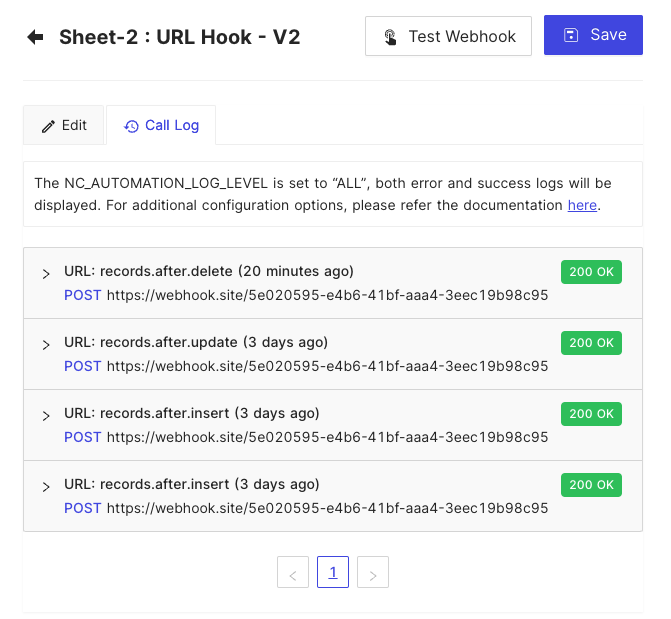
|
[//]: # ()
|
|
[//]: # (Call Log allows user to check the call history of the hook. By default, it has been disabled. However, it can be configured by using environment variable `NC_AUTOMATION_LOG_LEVEL`.)
|
|
|
|
[//]: # ()
|
|
[//]: # (- `NC_AUTOMATION_LOG_LEVEL=OFF`: No logs will be displayed and no history will be inserted to meta database.)
|
|
|
|
[//]: # (- `NC_AUTOMATION_LOG_LEVEL=ERROR`: only error logs will be displayed and history of error logs will be inserted to meta database.)
|
|
|
|
[//]: # (- `NC_AUTOMATION_LOG_LEVEL=ALL`: Both error and success logs will be displayed and history of both types of logs will be inserted to meta database. **This option is only available for Enterprise Edition.**)
|
|
|
|
[//]: # ()
|
|
[//]: # ()
|
|
|
|
|
|
## Environment Variables
|
|
In self-hosted version, you can configure the following environment variables to customize the webhook behavior.
|
|
- NC_ALLOW_LOCAL_HOOKS: Allow localhost based links to be triggered. Default: false
|
|
|
|
Find more about environment variables [here](/getting-started/self-hosted/environment-variables) |