mirror of
https://github.com/nocodb/nocodb.git
synced 2026-04-30 21:36:36 +00:00

61 lines
1.5 KiB
Markdown
61 lines
1.5 KiB
Markdown
---
|
|
title: "Development Setup"
|
|
description: "How to set-up your development environment"
|
|
---
|
|
|
|
## Clone the repo
|
|
```
|
|
git clone https://github.com/nocodb/nocodb
|
|
cd nocodb/packages
|
|
```
|
|
|
|
## Build SDK
|
|
|
|
```
|
|
# build nocodb-sdk
|
|
cd nocodb-sdk
|
|
npm install
|
|
npm run build
|
|
```
|
|
|
|
## Build Backend
|
|
|
|
```
|
|
# build backend - runs on port 8080
|
|
cd ../nocodb
|
|
npm install
|
|
npm run watch:run
|
|
```
|
|
|
|
## Build Frontend
|
|
|
|
```
|
|
# build frontend - runs on port 3000
|
|
cd ../nc-gui
|
|
npm install
|
|
npm run dev
|
|
```
|
|
|
|
Any changes made to frontend and backend will be automatically reflected in the browser.
|
|
|
|
## Enabling CI-CD for Draft PR
|
|
|
|
CI-CD will be triggered on moving a PR from draft state to `Ready for review` state & on pushing changes to `Develop`. To verify CI-CD before requesting for review, add label `trigger-CI` on Draft PR.
|
|
|
|
## Accessing CI-CD Failure Screenshots
|
|
|
|
For Playwright tests, screenshots are captured on the tests. These will provide vital clues for debugging possible issues observed in CI-CD. To access screenshots, Open link associated with CI-CD run & click on `Artifacts`
|
|
|
|

|
|
|
|
## Accessing 'Easter egg' menu
|
|
|
|
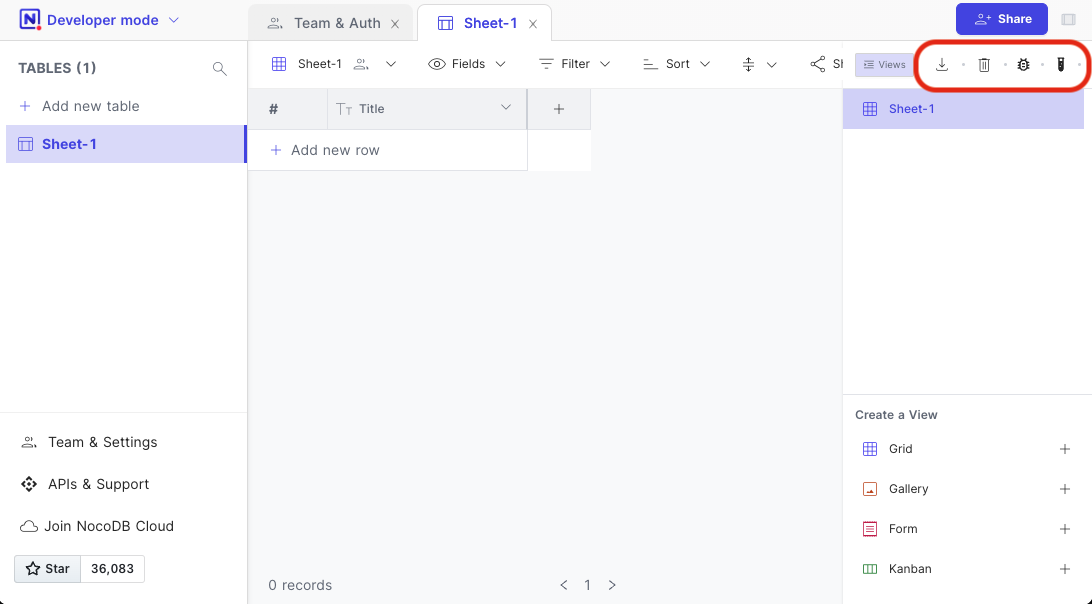
Double click twice on empty space between `View list` & `Share` button to the left top of Grid view; following options become accessible
|
|
1. Export Cache
|
|
2. Delete Cache
|
|
3. Debug Meta
|
|
4. Toggle Beta Features
|
|
|
|
|
|
|