mirror of
https://github.com/nocodb/nocodb.git
synced 2026-04-30 16:56:45 +00:00

111 lines
3.2 KiB
Markdown
111 lines
3.2 KiB
Markdown
---
|
|
title: 'Upgrading'
|
|
description: 'Upgrading NocoDB : Docker, Node, Heroku and Homebrew!'
|
|
position: 20
|
|
category: 'Getting started'
|
|
menuTitle: 'Upgrading'
|
|
link: https://codesandbox.io/embed/vigorous-firefly-80kq5?hidenavigation=1&theme=dark
|
|
---
|
|
|
|
## Docker
|
|
|
|
### Find, Stop & Delete NocoDB Docker Container
|
|
|
|
```bash
|
|
# find NocoDB container ID
|
|
docker ps
|
|
# stop NocoDB container
|
|
docker stop <YOUR_CONTAINER_ID>
|
|
# delete NocoDB container
|
|
docker rm <YOUR_CONTAINER_ID>
|
|
```
|
|
|
|
### Find & Remove NocoDB Docker Image
|
|
|
|
```bash
|
|
# find NocoDB image
|
|
docker images
|
|
# delete NocoDB image
|
|
docker rmi <YOUR_IMAGE_ID>
|
|
```
|
|
|
|
### Pull the latest NocoDB image with same environment variables
|
|
|
|
```bash
|
|
docker run -d -p 8080:8080 \
|
|
-e NC_DB="<YOUR_NC_DB_URL>" \
|
|
-e NC_AUTH_JWT_SECRET="<YOUR_NC_AUTH_JWT_SECRET_IF_GIVEN>" \
|
|
nocodb/nocodb:latest
|
|
```
|
|
|
|
Updating nocodb docker container is similar to updating [any other docker containers](https://www.whitesourcesoftware.com/free-developer-tools/blog/update-docker-images/).
|
|
|
|
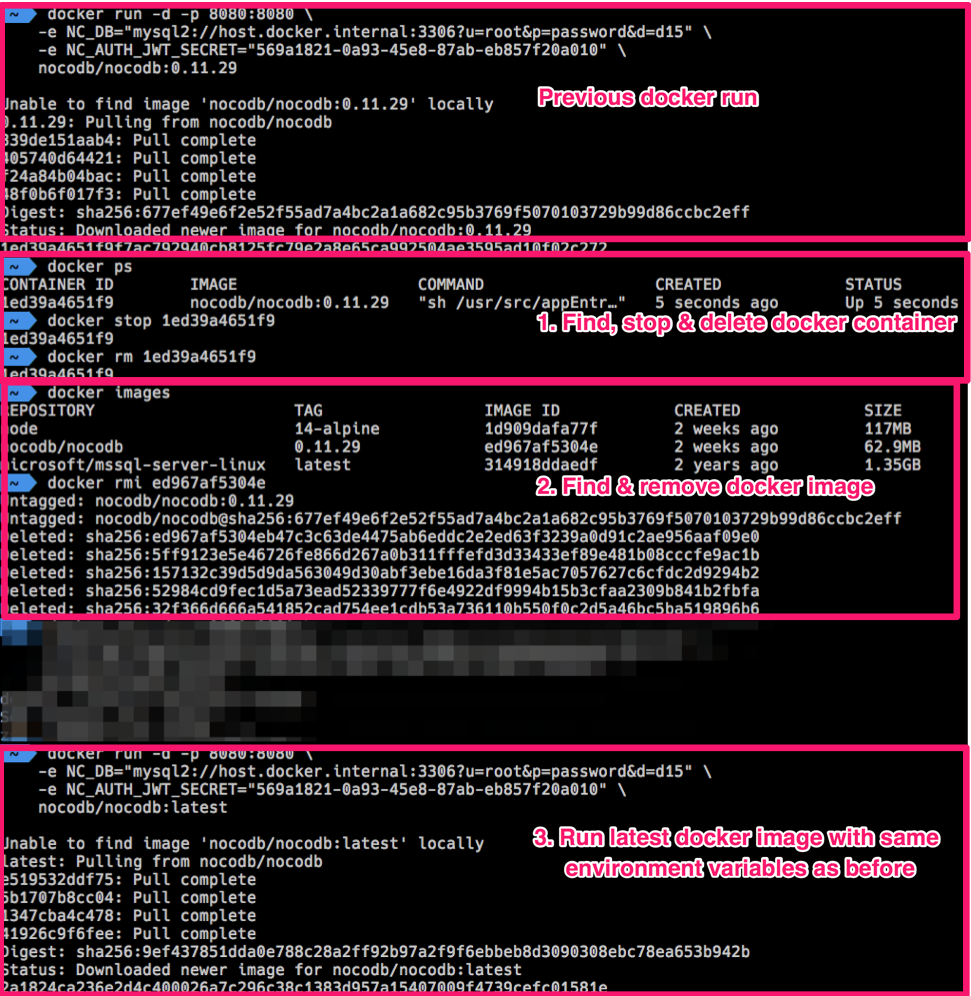
### Example: Docker Upgrade
|
|
|
|
|
|
## Node
|
|
|
|
Updating docker container is similar to updating a npm package.
|
|
|
|
From your root folder
|
|
|
|
#### Uninstall NocoDB package
|
|
|
|
```bash
|
|
npm uninstall nocodb
|
|
```
|
|
#### Install NocoDB package
|
|
|
|
```bash
|
|
npm install --save nocodb
|
|
```
|
|
|
|
## Heroku
|
|
|
|
### Using the Heroku CLI login
|
|
|
|
```bash
|
|
heroku container:login
|
|
docker pull nocodb/nocodb:latest
|
|
docker tag nocodb/nocodb:latest registry.heroku.com/<HEROKU_APP_NAME>/web
|
|
docker push registry.heroku.com/<HEROKU_APP_NAME>/web
|
|
heroku container:release -a <HEROKU_APP_NAME> web
|
|
```
|
|
|
|
#### On Apple M1 Chipset
|
|
|
|
> Please make sure you change Docker's default architecture to `linux/amd64` by running the following command _before_ executing the aforementioned steps
|
|
>
|
|
> ```export DOCKER_DEFAULT_PLATFORM=linux/amd64```
|
|
>
|
|
> More details can be found [here](https://medium.com/geekculture/from-apple-silicon-to-heroku-docker-registry-without-swearing-36a2f59b30a3).
|
|
|
|
### Using GitHub
|
|
|
|
Fork the [nocodb-seed-heroku repository](https://github.com/nocodb/nocodb-seed-heroku) to your GitHub account.
|
|
Login to Heroku, go to your NocoDB app, and head to the "Deploy" tab.
|
|
Select "GitHub" in the "Deployment method" section.
|
|
|
|
In the "Connect to GitHub" section, search for your forked nocodb-seed-heroku repo. Connect to it:
|
|
|
|

|
|
|
|
In the "Automatic deploys" section, select "Enable Automatic Deploys":
|
|
|
|

|
|
|
|
Head back to your forked nocodb-seed-heroku repo on your GitHub account. Edit one of your files and make a simple modification (example, add some random characters to the readme.md) and commit the change directly to the main branch.
|
|
|
|
This will trigger the Heroku deployment. Your app should now be updated to the latest release of NocoDB.
|
|
|
|
## Homebrew
|
|
|
|
Run following commands to upgrade Homebrew Nocodb version.
|
|
|
|
```bash
|
|
# Update the local homebrew formulas
|
|
brew update
|
|
# Upgrade nocodb package
|
|
brew upgrade nocodb
|
|
```
|