mirror of
https://github.com/nocodb/nocodb.git
synced 2026-05-02 03:16:56 +00:00

261 lines
10 KiB
Markdown
261 lines
10 KiB
Markdown
<h1 align="center" style="border-bottom: none">
|
||
<b>
|
||
<a href="https://www.nocodb.com">NocoDB </a><br>
|
||
</b>
|
||
✨ オープンソースのAirtableの代替案 ✨ <br>
|
||
|
||
</h1>
|
||
<p align="center">
|
||
MySQL、PostgreSQL、SQL Server、SQLite&Mariadbをスマートスプレッドシートに変えます。
|
||
</p>
|
||
<div align="center">
|
||
|
||
[](https://travis-ci.com/github/NocoDB/NocoDB)
|
||
[](http://nodejs.org/download/)
|
||
[](https://twitter.com/NocoDB)
|
||
|
||
</div>
|
||
|
||
<p align="center">
|
||
<a href="http://www.nocodb.com"><b>Website</b></a> •
|
||
<a href="https://discord.gg/5RgZmkW"><b>Discord</b></a> •
|
||
<a href="https://twitter.com/nocodb"><b>Twitter</b></a> •
|
||
<a href="https://www.reddit.com/r/NocoDB/"><b>Reddit</b></a> •
|
||
<a href="https://docs.nocodb.com/"><b>Documentation</b></a>
|
||
</p>
|
||
|
||
|
||
|
||
<img src="https://static.scarf.sh/a.png?x-pxid=c12a77cc-855e-4602-8a0f-614b2d0da56a" />
|
||
|
||
<a href="https://www.producthunt.com/posts/nocodb?utm_source=badge-featured&utm_medium=badge&utm_souce=badge-nocodb" target="_blank"><img src="https://api.producthunt.com/widgets/embed-image/v1/featured.svg?post_id=297536&theme=dark" alt="NocoDB - The Open Source Airtable alternative | Product Hunt" style="width: 250px; height: 54px;" width="250" height="54" /></a>
|
||
|
||
# クイック試し
|
||
|
||
### 1-Click Deploy
|
||
|
||
#### Heroku
|
||
|
||
<a href="https://heroku.com/deploy?template=https://github.com/nocodb/nocodb-seed-heroku">
|
||
<img
|
||
src="https://www.herokucdn.com/deploy/button.svg"
|
||
width="300px"
|
||
alt="Deploy NocoDB to Heroku with 1-Click"
|
||
/>
|
||
</a>
|
||
<br>
|
||
|
||
### Docker を使う
|
||
|
||
```bash
|
||
docker run -d --name nocodb -p 8080:8080 nocodb/nocodb:latest
|
||
```
|
||
|
||
> To persist data you can mount volume at `/usr/app/data/`.
|
||
|
||
### NPM を使用して
|
||
|
||
```
|
||
npx create-nocodb-app
|
||
```
|
||
|
||
### git を使う
|
||
|
||
```
|
||
git clone https://github.com/nocodb/nocodb-seed
|
||
cd nocodb-seed
|
||
npm install
|
||
npm start
|
||
```
|
||
|
||
### GUI
|
||
|
||
アクセスダッシュボードを使用して : [http://localhost:8080/dashboard](http://localhost:8080/dashboard)
|
||
|
||
# 私たちのコミュニティに参加する
|
||
|
||
<a href="https://discord.gg/5RgZmkW">
|
||
<img src="https://discordapp.com/api/guilds/661905455894888490/widget.png?style=banner3" alt="">
|
||
</a>
|
||
<br>
|
||
<br>
|
||
|
||
# スクリーンショット
|
||
|
||

|
||
<br>
|
||
|
||

|
||
<br>
|
||
|
||

|
||
<br>
|
||
|
||

|
||
<br>
|
||
|
||

|
||
<br>
|
||
|
||

|
||
<br>
|
||
|
||

|
||
<br>
|
||
|
||

|
||
<br>
|
||
|
||

|
||
<br>
|
||
|
||

|
||
<br>
|
||
|
||

|
||
<br>
|
||
|
||
# 特徴
|
||
|
||
### リッチスプレッドシートインターフェース
|
||
|
||
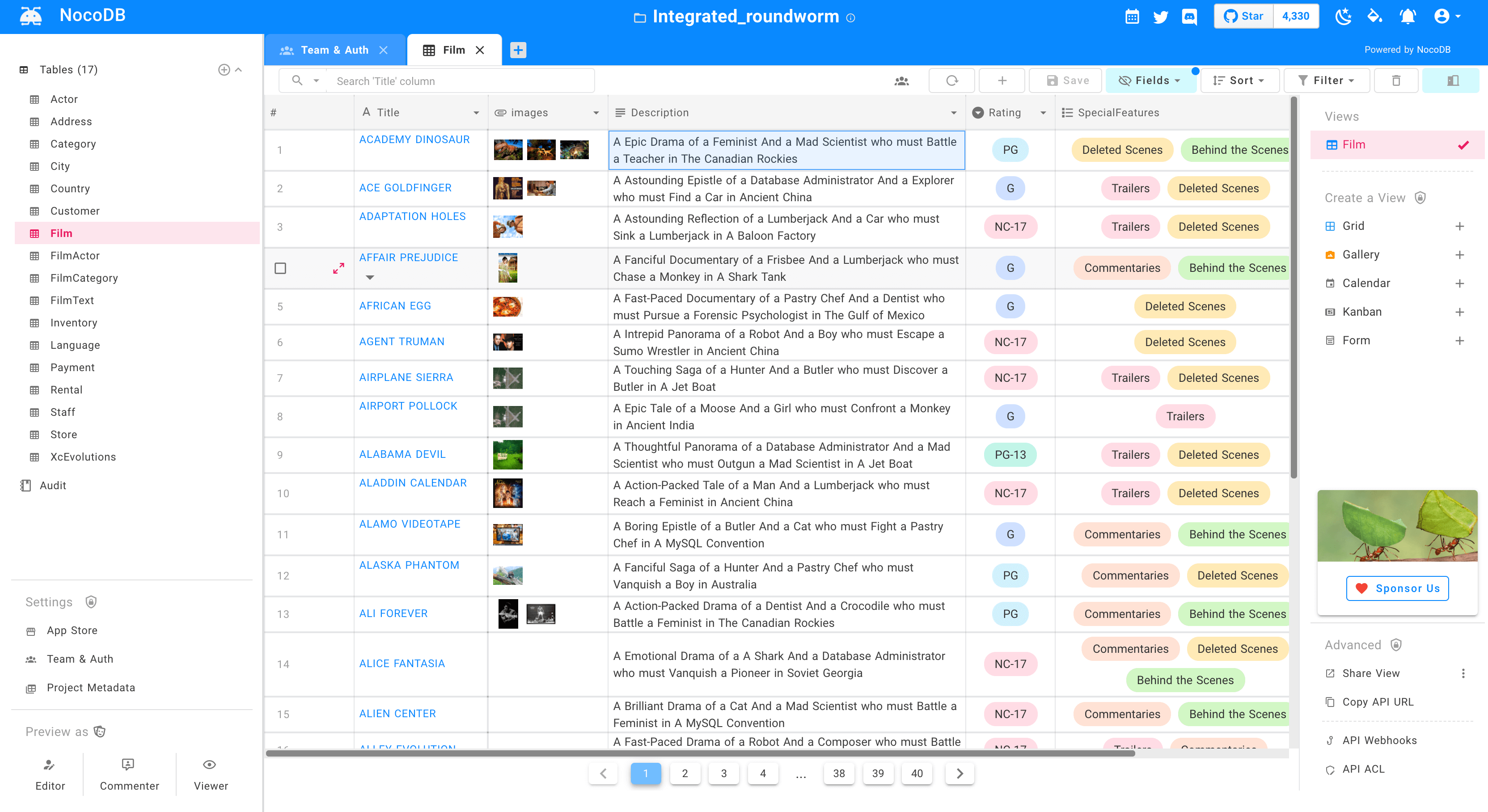
検索、並べ替え、フィルタリング、列を隠す
|
||
|
||
- ⚡ ビューを作成する:グリッド、ギャラリー、カンバン、ガント、フォーム
|
||
- ⚡ シェアビュー:Public&Password Protected.
|
||
- ⚡ パーソナル&ロックビュー
|
||
- ⚡ 画像を細胞にアップロードする(S3、Minio、GCP、Azure、Digitalocean、Linode、Ovh、Backblaze で動作します)。
|
||
- ⚡ ロール:所有者、作成者、エディタ、コメンタ、ビューア、コメンタ、カスタムロール。
|
||
- ⚡ アクセス制御:データベース、テーブル&カラムレベルでも微細に粒度のアクセス制御。
|
||
|
||
### ワークフロー自動化のための App Store:
|
||
|
||
- ⚡ チャット:マイクロソフトチーム、たるみ、不和、マッピー
|
||
- ⚡ メール:SMTP、SE、MailChimp
|
||
- ⚡ SMS:Twilio.
|
||
- ⚡ whatsapp.
|
||
- ⚡ 第三者 APIS
|
||
|
||
### プログラムによる API アクセスによるアクセス
|
||
|
||
- ⚡ REST APIS(Swagger)
|
||
- ⚡ GraphQLAPI。
|
||
- ⚡ JWT 認証とソーシャル AUTH を含む
|
||
- ⚡ ZAPIER、Integomat と統合する API トークン。
|
||
|
||
# Production Setup
|
||
|
||
NoCodb には、スプレッドシートビューと外部データベースのメタデータを格納するためのデータベースが必要です。このデータベースの接続パラメータは、NC_DB 環境変数で指定できます。
|
||
|
||
## Docker
|
||
|
||
#### Example MySQL
|
||
|
||
```
|
||
docker run -d -p 8080:8080 \
|
||
-e NC_DB="mysql2://host.docker.internal:3306?u=root&p=password&d=d1" \
|
||
-e NC_AUTH_JWT_SECRET="569a1821-0a93-45e8-87ab-eb857f20a010" \
|
||
nocodb/nocodb:latest
|
||
```
|
||
|
||
#### Example Postgres
|
||
|
||
```
|
||
docker run -d -p 8080:8080 \
|
||
-e NC_DB="pg://host:port?u=user&p=password&d=database" \
|
||
-e NC_AUTH_JWT_SECRET="569a1821-0a93-45e8-87ab-eb857f20a010" \
|
||
nocodb/nocodb:latest
|
||
```
|
||
|
||
#### Example SQL Server
|
||
|
||
```
|
||
docker run -d -p 8080:8080 \
|
||
-e NC_DB="mssql://host:port?u=user&p=password&d=database" \
|
||
-e NC_AUTH_JWT_SECRET="569a1821-0a93-45e8-87ab-eb857f20a010" \
|
||
nocodb/nocodb:latest
|
||
```
|
||
|
||
## Docker Compose
|
||
|
||
```
|
||
git clone https://github.com/nocodb/nocodb
|
||
cd nocodb
|
||
cd docker-compose
|
||
cd mysql or pg or mssql
|
||
docker-compose up
|
||
```
|
||
|
||
## Environment variables
|
||
|
||
| Variable | Mandatory | Comments | If absent |
|
||
| ---------------------------------- | --------- | -------------------------------------------------------------------------------------------------------- | --------------------------------------------- |
|
||
| NC_DB | Yes | See our database URLs | A local SQLite will be created in root folder |
|
||
| DATABASE_URL | No | JDBC URL Format. Can be used instead of NC_DB. Used in 1-Click Heroku deployment | |
|
||
| DATABASE_URL_FILE | No | path to file containing JDBC URL Format. Can be used instead of NC_DB. Used in 1-Click Heroku deployment | |
|
||
| NC_PUBLIC_URL | Yes | Used for sending Email invitations | Best guess from http request params |
|
||
| NC_AUTH_JWT_SECRET | Yes | JWT secret used for auth and storing other secrets | A Random secret will be generated |
|
||
| NC_SENTRY_DSN | No | For Sentry monitoring | |
|
||
| NC_CONNECT_TO_EXTERNAL_DB_DISABLED | No | Disable Project creation with external database | |
|
||
| NC_DISABLE_TELE | No | Disable telemetry | |
|
||
| NC_BACKEND_URL | No | Custom Backend URL | `http://localhost:8080` will be used |
|
||
|
||
# Development setup
|
||
|
||
```
|
||
git clone https://github.com/nocodb/nocodb
|
||
cd nocodb
|
||
|
||
# run backend
|
||
cd packages/nocodb
|
||
npm install
|
||
npm run watch:run
|
||
|
||
# open localhost:8080/dashboard in browser
|
||
|
||
# run frontend
|
||
cd packages/nc-gui
|
||
npm install
|
||
npm run dev
|
||
|
||
# open localhost:3000/dashboard in browser
|
||
```
|
||
|
||
Changes made to code automatically restart.
|
||
|
||
## Running Cypress tests locally
|
||
|
||
```shell
|
||
# install dependencies(cypress)
|
||
npm install
|
||
|
||
# run mysql database with required database using docker compose
|
||
docker-compose -f ./scripts/docker-compose-cypress.yml up
|
||
|
||
# Run backend api using following command
|
||
npm run start:api
|
||
|
||
# Run frontend web UI using following command
|
||
npm run start:web
|
||
|
||
# wait until both 3000 and 8080 ports are available
|
||
# and run cypress test using following command
|
||
npm run cypress:run
|
||
|
||
# or run following command to run it with GUI
|
||
npm run cypress:open
|
||
```
|
||
|
||
# Contributing
|
||
|
||
- Please take a look at ./scripts/contribute/HowToApplyLicense.md
|
||
- Ignore adding headers for .json or .md or .yml
|
||
|
||
# 🎯 なぜこれを構築しているのですか?
|
||
|
||
ほとんどのインターネットビジネスは、彼らのビジネスニーズを解決するためにスプレッドシートまたはデータベースのどちらかでそれ自体を装備しています。スプレッドシートは 1 日ごとに 10 億+人間によって使用されます。ただし、コンピューティングに関してより強力なツールであるデータベースの同様のスピードで作業しているような方法です。これを SaaS 製品で解決しようとすると、恐ろしいアクセス制御、ベンダーロック、データロック、突然の価格が変更され、最も重要なことに将来可能なものに関するガラスの天井を意味しています。
|
||
|
||
# ❤ 私たちの使命 :
|
||
|
||
私たちの使命は、世界ですべての単一のインターネットビジネスにオープンソースであるデータベースのための最も強力なノーコードインターフェースを提供することです。これは強力なコンピューティングツールへのアクセスを民主化するだけでなく、インターネット上で急進的な厄介な建築能力を持つ 10 億+人をもたらします。
|