mirror of
https://github.com/nocodb/nocodb.git
synced 2026-04-30 12:46:36 +00:00

51 lines
2.2 KiB
Markdown
51 lines
2.2 KiB
Markdown
---
|
|
title: 'Accessing APIs'
|
|
description: 'How to access NocoDB APIs with Auth or API token?'
|
|
position: 1000
|
|
category: 'Developer Resources'
|
|
menuTitle: 'Accessing APIs'
|
|
---
|
|
|
|
NocoDB APIs can be authorized by either Auth Token or API Token.
|
|
|
|
## Auth Token
|
|
|
|
Auth Token is a JWT Token generated based on the logged-in user. By default, the token is only valid for 10 hours. However, you can change the value by defining it using environment variable `NC_JWT_EXPIRES_IN`. If you are passing Auth Token, make sure that the header is called `xc-auth`.
|
|
|
|
- Go to NocoDB Project, click the rightmost button and click ``Copy Auth Token``.
|
|
|
|
<img width="357" alt="image" src="https://user-images.githubusercontent.com/35857179/194856397-b2e194e8-5ca1-420e-8b46-e1345d1d91d3.png">
|
|
|
|
## API Token
|
|
|
|
NocoDB allows creating API tokens which allow it to be integrated seamlessly with 3rd party apps. API Token is a Nano ID with a length of 40. If you are passing API Token, make sure that the header is called `xc-token`.
|
|
|
|
- Open `Project Menu`, click on `Team & Settings`
|
|
|
|
<img width="322" alt="image" src="https://user-images.githubusercontent.com/35857179/194856648-67936db0-ee4d-4060-be3d-af9f86ef8fc6.png">
|
|
|
|
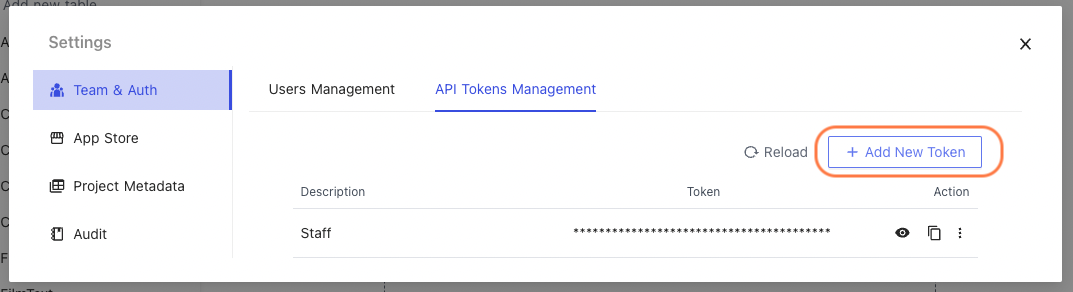
- Click `API Tokens Management` tab under `Team & Auth` section
|
|
|
|
- Click Add New Token
|
|
|
|
|
|
|
|
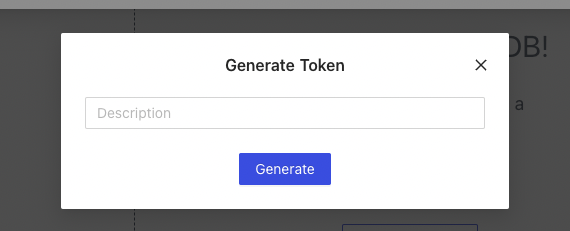
- Type an recognizable name for your token and click `Generate`
|
|
|
|
|
|
|
|
- Copy API token to your clipboard; use action menu to the right of token list
|
|
|
|
## Swagger UI
|
|
|
|
You can interact with the API's resources via Swagger UI.
|
|
|
|
- Go to NocoDB Project, click the rightmost button and click ``Swagger APIs Doc``.
|
|
|
|
<img width="325" alt="image" src="https://user-images.githubusercontent.com/35857179/194856535-c81bfc2a-8cdd-41aa-8aa6-9c667c972fa4.png">
|
|
|
|
- Click ``Authorize``, paste the token you copied in above steps and click `Authorize` to save.
|
|
|
|

|
|
|