mirror of
https://github.com/nocodb/nocodb.git
synced 2026-04-28 14:47:14 +00:00

200 lines
6.7 KiB
Markdown
200 lines
6.7 KiB
Markdown
<h1 align="center" style="border-bottom: none">
|
||
<b>
|
||
<a href="https://www.nocodb.com">NocoDB </a><br>
|
||
</b>
|
||
✨ Airtable 的开源替代品 ✨ <br>
|
||
</h1>
|
||
<p align="center">
|
||
将 MySQL、PostgreSQL、SQL Server、SQLite 或 MariaDB 转换为智能电子表格。
|
||
</p>
|
||
<div align="center">
|
||
|
||
[](https://travis-ci.com/github/NocoDB/NocoDB)
|
||
[](http://nodejs.org/download/)
|
||
[](https://conventionalcommits.org)
|
||
|
||
</div>
|
||
|
||
<p align="center">
|
||
<a href="http://www.nocodb.com"><b>Website</b></a> •
|
||
<a href="https://discord.gg/5RgZmkW"><b>Discord</b></a> •
|
||
<a href="https://twitter.com/nocodb"><b>Twitter</b></a> •
|
||
<a href="https://www.reddit.com/r/NocoDB/"><b>Reddit</b></a> •
|
||
<a href="https://docs.nocodb.com/"><b>Documentation</b></a>
|
||
</p>
|
||
|
||
|
||
|
||
<img src="https://static.scarf.sh/a.png?x-pxid=c12a77cc-855e-4602-8a0f-614b2d0da56a" />
|
||
|
||
<p align="center">
|
||
<a href="https://www.producthunt.com/posts/nocodb?utm_source=badge-featured&utm_medium=badge&utm_souce=badge-nocodb" target="_blank"><img src="https://api.producthunt.com/widgets/embed-image/v1/featured.svg?post_id=297536&theme=dark" alt="NocoDB - The Open Source Airtable alternative | Product Hunt" style="width: 250px; height: 54px;" width="250" height="54" /></a>
|
||
</p>
|
||
|
||
# 快速尝试
|
||
### 一键式部署
|
||
|
||
#### Heroku
|
||
<a href="https://heroku.com/deploy?template=https://github.com/nocodb/nocodb-seed-heroku">
|
||
<img
|
||
src="https://www.herokucdn.com/deploy/button.svg"
|
||
width="300px"
|
||
alt="Deploy NocoDB to Heroku with 1-Click"
|
||
/>
|
||
</a>
|
||
<br>
|
||
|
||
### 使用Docker
|
||
```bash
|
||
docker run -d --name nocodb -p 8080:8080 nocodb/nocodb:latest
|
||
```
|
||
|
||
- NocoDB needs a database as input : See [Production Setup](https://github.com/nocodb/nocodb/blob/master/README.md#production-setup).
|
||
- 要使用数据持久化,你可以挂载到 `/usr/app/data/`。
|
||
|
||
示例:
|
||
|
||
```
|
||
docker run -d -p 8080:8080 --name nocodb -v /local/path:/usr/app/data/ nocodb/nocodb:latest
|
||
```
|
||
|
||
### 使用NPM
|
||
```
|
||
npx create-nocodb-app
|
||
```
|
||
### 使用git
|
||
```
|
||
git clone https://github.com/nocodb/nocodb-seed
|
||
cd nocodb-seed
|
||
npm install
|
||
npm start
|
||
```
|
||
|
||
### GUI
|
||
|
||
使用仪表板使用 : [http://localhost:8080/dashboard](http://localhost:8080/dashboard)
|
||
|
||
|
||
# 加入我们的社区
|
||
<a href="https://discord.gg/5RgZmkW">
|
||
<img src="https://discordapp.com/api/guilds/661905455894888490/widget.png?style=banner3" alt="">
|
||
</a>
|
||
<br>
|
||
<br>
|
||
|
||
# 截图
|
||
|
||

|
||
<br>
|
||
|
||

|
||
<br>
|
||
|
||

|
||
<br>
|
||
|
||

|
||
<br>
|
||
|
||

|
||
<br>
|
||
|
||

|
||
<br>
|
||
|
||

|
||
<br>
|
||
|
||

|
||
<br>
|
||
|
||

|
||
<br>
|
||
|
||

|
||
<br>
|
||
|
||

|
||
<br>
|
||
|
||
# 特征
|
||
### 丰富的电子表格功能
|
||
|
||
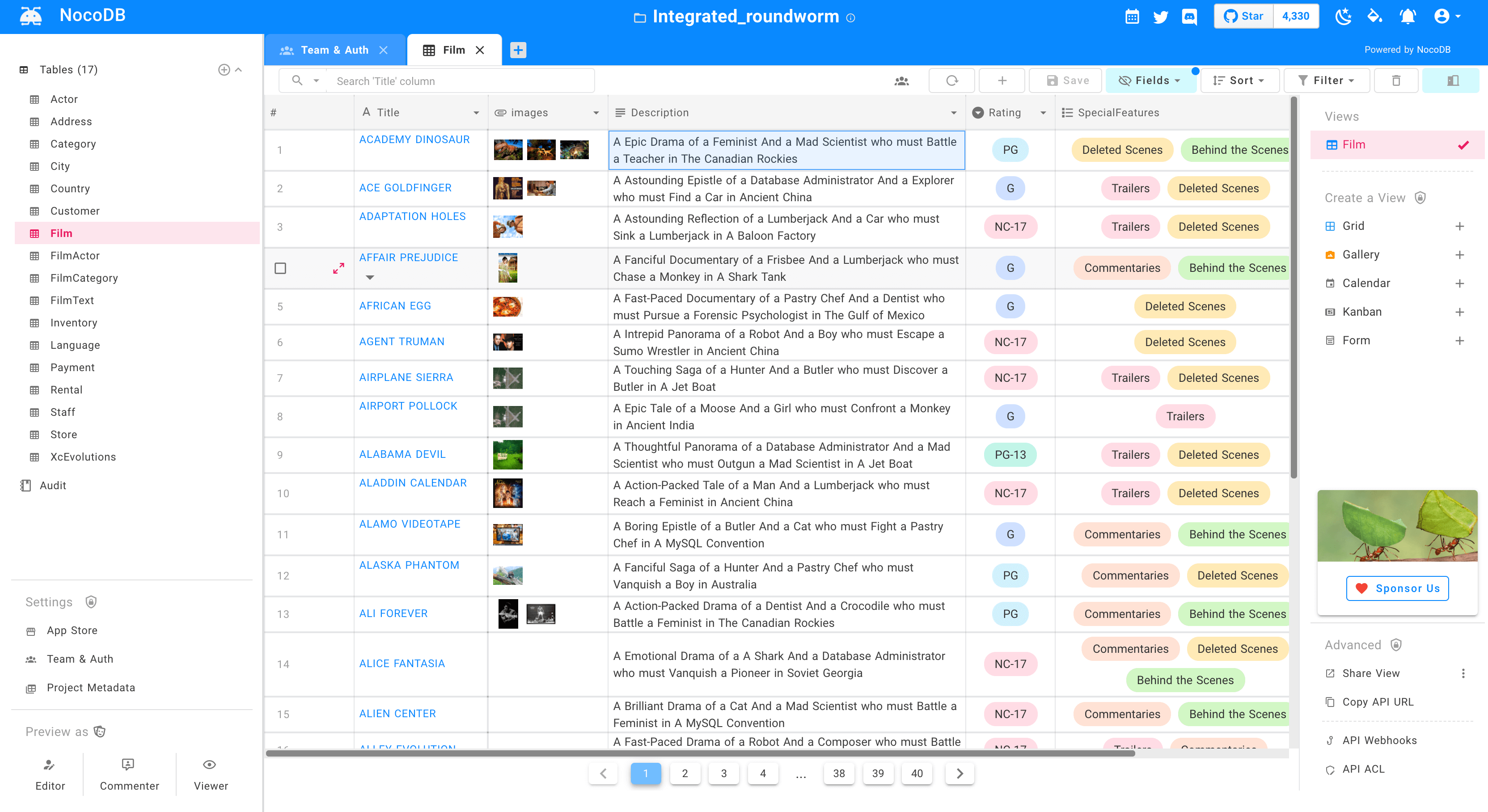
- ⚡ 搜索,排序,过滤,隐藏列
|
||
- ⚡ 创建视图:网格,画廊,看板,甘特图,表单
|
||
- ⚡ 分享视图:公开 或 密码保护
|
||
- ⚡ 个人和锁定视图
|
||
- ⚡ 将图像上传到单元格(使用S3,Minio,GCP,Azure,DigitalOcean,Linode,OVH,Backblaze)
|
||
- ⚡ 角色:所有者,创建者,编辑器,查看器,评论者,自定义角色。
|
||
- ⚡ 访问控制:在 `数据库`、`表`、`列` 级别的访问控制。
|
||
|
||
### 工作流自动化应用商店:
|
||
- ⚡ 聊天:微软Teams,Slack,Discord,Mattermost
|
||
- ⚡ 电子邮件:SMTP,SES,MailChimp
|
||
- ⚡ 短信:Twilio
|
||
- ⚡ whatsapp
|
||
- ⚡ 任何第三方API
|
||
|
||
### Programmatic API访问通过:
|
||
- ⚡ REST API (Swagger)
|
||
- ⚡ GraphQL API
|
||
- ⚡ JWT身份验证和社交验证
|
||
- ⚡ 与Zapier,Integromat集成的API
|
||
|
||
# 生产安装
|
||
NoCodb 要求一个数据库用来存储电子表格视图和外部元数据。可以在`NC_DB`环境变量中指定此数据库的连接参数。
|
||
|
||
## Docker
|
||
|
||
#### MySQL 示例
|
||
```bash
|
||
docker run -d -p 8080:8080 \
|
||
-e NC_DB="mysql2://host.docker.internal:3306?u=root&p=password&d=d1" \
|
||
-e NC_AUTH_JWT_SECRET="569a1821-0a93-45e8-87ab-eb857f20a010" \
|
||
nocodb/nocodb:latest
|
||
```
|
||
|
||
#### Postgres 示例
|
||
```bash
|
||
docker run -d -p 8080:8080 \
|
||
-e NC_DB="pg://host:port?u=user&p=password&d=database" \
|
||
-e NC_AUTH_JWT_SECRET="569a1821-0a93-45e8-87ab-eb857f20a010" \
|
||
nocodb/nocodb:latest
|
||
```
|
||
|
||
#### SQL Server 示例
|
||
```bash
|
||
docker run -d -p 8080:8080 \
|
||
-e NC_DB="mssql://host:port?u=user&p=password&d=database" \
|
||
-e NC_AUTH_JWT_SECRET="569a1821-0a93-45e8-87ab-eb857f20a010" \
|
||
nocodb/nocodb:latest
|
||
```
|
||
|
||
## Docker Compose
|
||
```bash
|
||
git clone https://github.com/nocodb/nocodb
|
||
cd docker-compose
|
||
cd mysql or pg or mssql
|
||
docker-compose up -d
|
||
```
|
||
|
||
## 环境变量
|
||
|
||
Please refer to [Environment variables](https://docs.nocodb.com/getting-started/installation#environment-variables)
|
||
|
||
# 开发安装
|
||
|
||
Please refer to [Development Setup](https://github.com/nocodb/nocodb/tree/master#development-setup)
|
||
|
||
# 贡献
|
||
|
||
Please refer to [Contribution Guide](https://github.com/nocodb/nocodb/blob/master/.github/CONTRIBUTING.md).
|
||
|
||
# 为什么我们建立这个?
|
||
|
||
大多数互联网业务都配备了电子表格或数据库以解决其业务需求,每天有上亿人使用电子表格。我们基于数据库运行更强大的工具能更高效地完成工作。用SaaS产品解决此问题的尝试已经意味着可怕的访问控制,供应商锁定,数据锁定,突然的价格变化,甚至是将来可能会阻碍发展。
|
||
|
||
# 我们的任务
|
||
|
||
我们的使命是为数据库提供最强大的无码界面,为世界上每一个互联网业务的开源使用。这不仅将民主化带给强大的计算工具,还将为数亿人增强他们的创造力。
|