 5f4d0ec343
## Summary TL;DR: teaches `codex-rs` / app-server to request a desktop-provided attestation token and attach it as `x-oai-attestation` on the scoped ChatGPT Codex request paths. 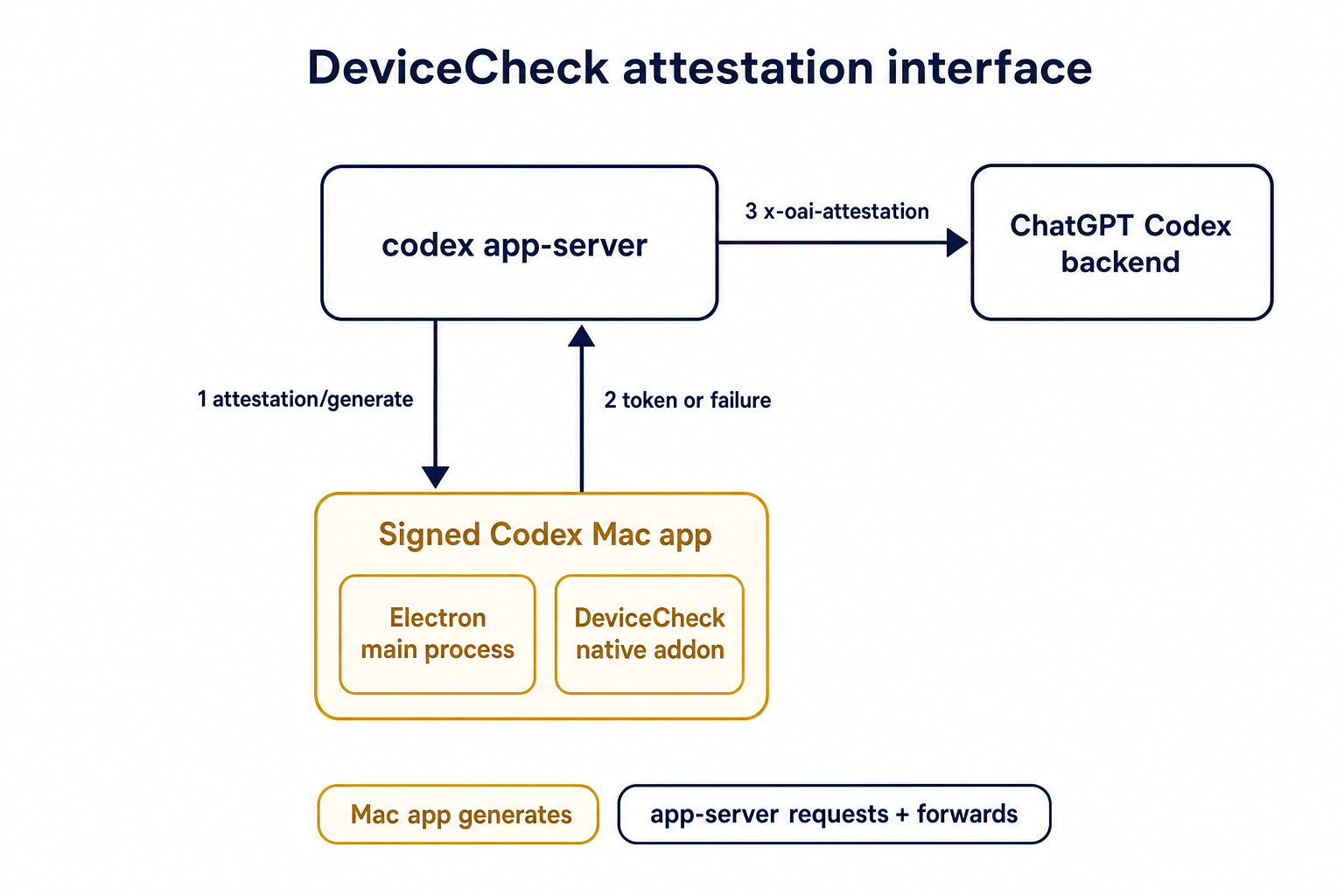 ## Details This PR teaches the Codex app-server runtime how to request and attach an attestation token. It does not generate DeviceCheck tokens directly; instead, it relies on the connected desktop app to advertise that it can generate attestation and then asks that app for a fresh header value when needed. The flow is: 1. The Codex desktop app connects to app-server. 2. During `initialize`, the app can advertise that it supports `requestAttestation`. 3. Before app-server calls selected ChatGPT Codex endpoints, it sends the internal server request `attestation/generate` to the app. 4. app-server receives a pre-encoded header value back. 5. app-server forwards that value as `x-oai-attestation` on the scoped outbound requests. The code in this repo is mostly protocol and runtime plumbing: it adds the app-server request/response shape, introduces an attestation provider in core, wires that provider into Responses / compaction / realtime setup paths, and covers the intended scoping with tests. The signed macOS DeviceCheck generation remains owned by the desktop app PR. ## Related PR - Codex desktop app implementation: https://github.com/openai/openai/pull/878649 ## Validation <details> <summary>Tests run</summary> ```sh cargo test -p codex-app-server-protocol cargo test -p codex-core attestation --lib cargo test -p codex-app-server --lib attestation ``` Also ran: ```sh just fix -p codex-core just fix -p codex-app-server just fix -p codex-app-server-protocol just fmt just write-app-server-schema ``` </details> <details> <summary>E2E DeviceCheck validation</summary> First validated the signed desktop app boundary directly: launched a packaged signed `Codex.app`, sent `attestation/generate`, decoded the returned `v1.` attestation header, and validated the extracted DeviceCheck token with `personal/jm/verify_devicecheck_token.py` using bundle ID `com.openai.codex`. Apple returned `status_code: 200` and `is_ok: true`. Then ran the fuller app + app-server flow. The packaged `Codex.app` launched a current-branch app-server via `CODEX_CLI_PATH`, and a local MITM proxy intercepted outbound `chatgpt.com` traffic. The app-server requested `attestation/generate` from the real Electron app process, and the intercepted `/backend-api/codex/responses` traffic included `x-oai-attestation` on both routes: ```text GET /backend-api/codex/responses Upgrade: websocket x-oai-attestation: present POST /backend-api/codex/responses Upgrade: none x-oai-attestation: present ``` The captured header decoded to a DeviceCheck token that also validated with Apple for `com.openai.codex` (`status_code: 200`, `is_ok: true`, team `2DC432GLL2`). </details> --------- Co-authored-by: Codex <noreply@openai.com>

npm i -g @openai/codex
or brew install --cask codex
Codex CLI is a coding agent from OpenAI that runs locally on your computer.

If you want Codex in your code editor (VS Code, Cursor, Windsurf), install in your IDE.
If you want the desktop app experience, run
codex app or visit the Codex App page.
If you are looking for the cloud-based agent from OpenAI, Codex Web, go to chatgpt.com/codex.
Quickstart
Installing and running Codex CLI
Install globally with your preferred package manager:
# Install using npm
npm install -g @openai/codex
# Install using Homebrew
brew install --cask codex
Then simply run codex to get started.
You can also go to the latest GitHub Release and download the appropriate binary for your platform.
Each GitHub Release contains many executables, but in practice, you likely want one of these:
- macOS
- Apple Silicon/arm64:
codex-aarch64-apple-darwin.tar.gz - x86_64 (older Mac hardware):
codex-x86_64-apple-darwin.tar.gz
- Apple Silicon/arm64:
- Linux
- x86_64:
codex-x86_64-unknown-linux-musl.tar.gz - arm64:
codex-aarch64-unknown-linux-musl.tar.gz
- x86_64:
Each archive contains a single entry with the platform baked into the name (e.g., codex-x86_64-unknown-linux-musl), so you likely want to rename it to codex after extracting it.
Using Codex with your ChatGPT plan
Run codex and select Sign in with ChatGPT. We recommend signing into your ChatGPT account to use Codex as part of your Plus, Pro, Business, Edu, or Enterprise plan. Learn more about what's included in your ChatGPT plan.
You can also use Codex with an API key, but this requires additional setup.
Docs
This repository is licensed under the Apache-2.0 License.